
Customer Portal — iCargos
Give every shipper a single, powerful place to book, track, and manage deliveries.
The iCargos Customer Portal turns your clients into self-serve partners: create bookings in seconds, upload bulk orders, print labels, track ETAs live, trigger reattempts/returns, view COD, and download reports—without calling your team.
Key Benefits
-
Create & upload orders fast (single booking or bulk Excel)
-
Live tracking & ETAs for each consignment, with instant ePOD (Signature/Photo/OTP via SMS alert)
-
Actionable dashboards: statuses, top cities, monthly trends, pending COD
-
Shipper Advice: request Reattempt/Return with notes—no tickets required
-
API & plugins (Shopify / WordPress) to automate everything


Who Uses the Portal
-
E-commerce brands & retailers needing quick bulk uploads and live tracking links
-
B2B shippers that want downloadable PODs and scheduled pickups
-
Finance teams reconciling COD and downloading monthly statements
-
Ops managers watching SLAs, exceptions, and city-wise performance
What the Customer Sees (Dashboard Overview)
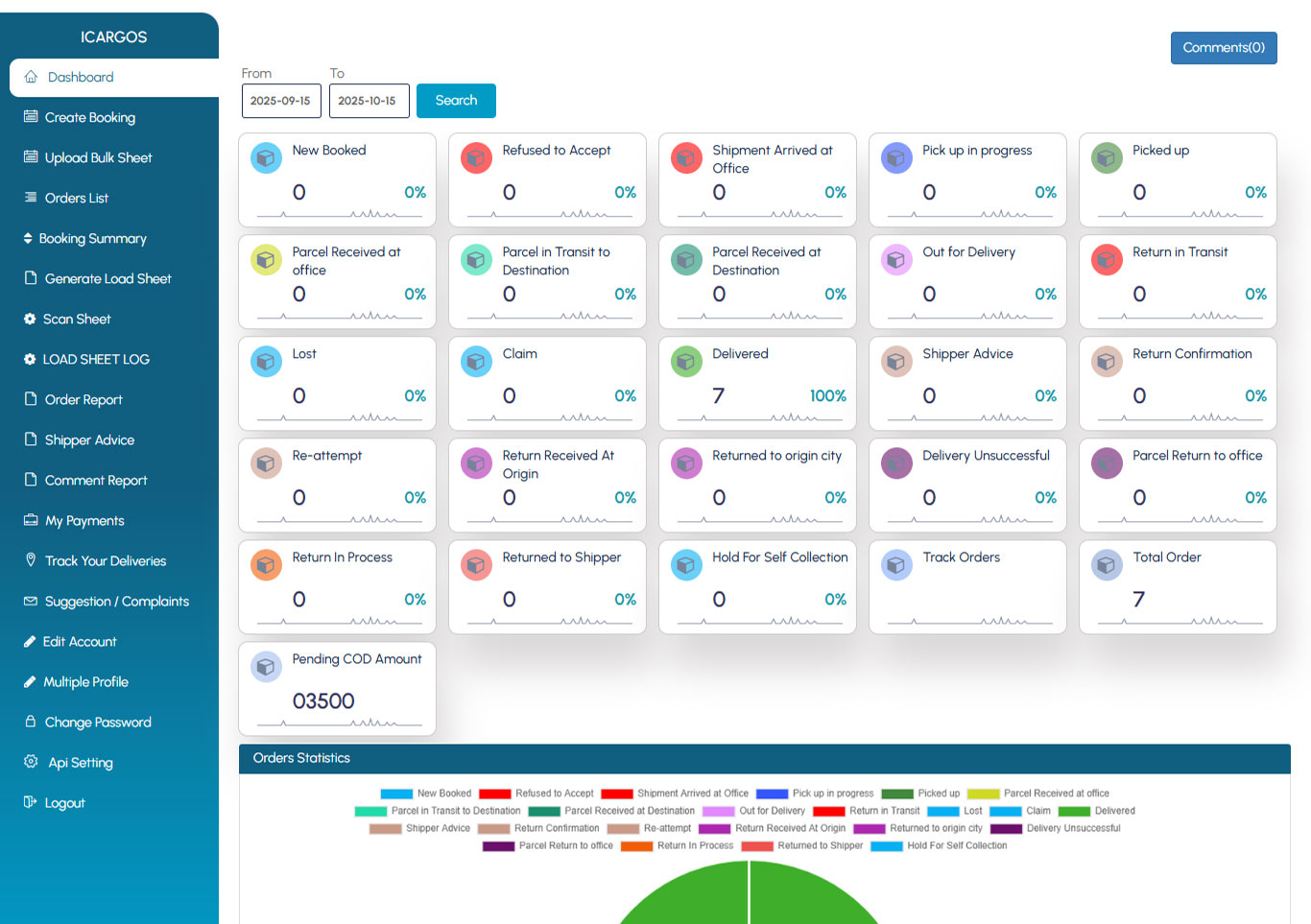
Show a clean screenshot of your dashboard here. Use callouts for:
-
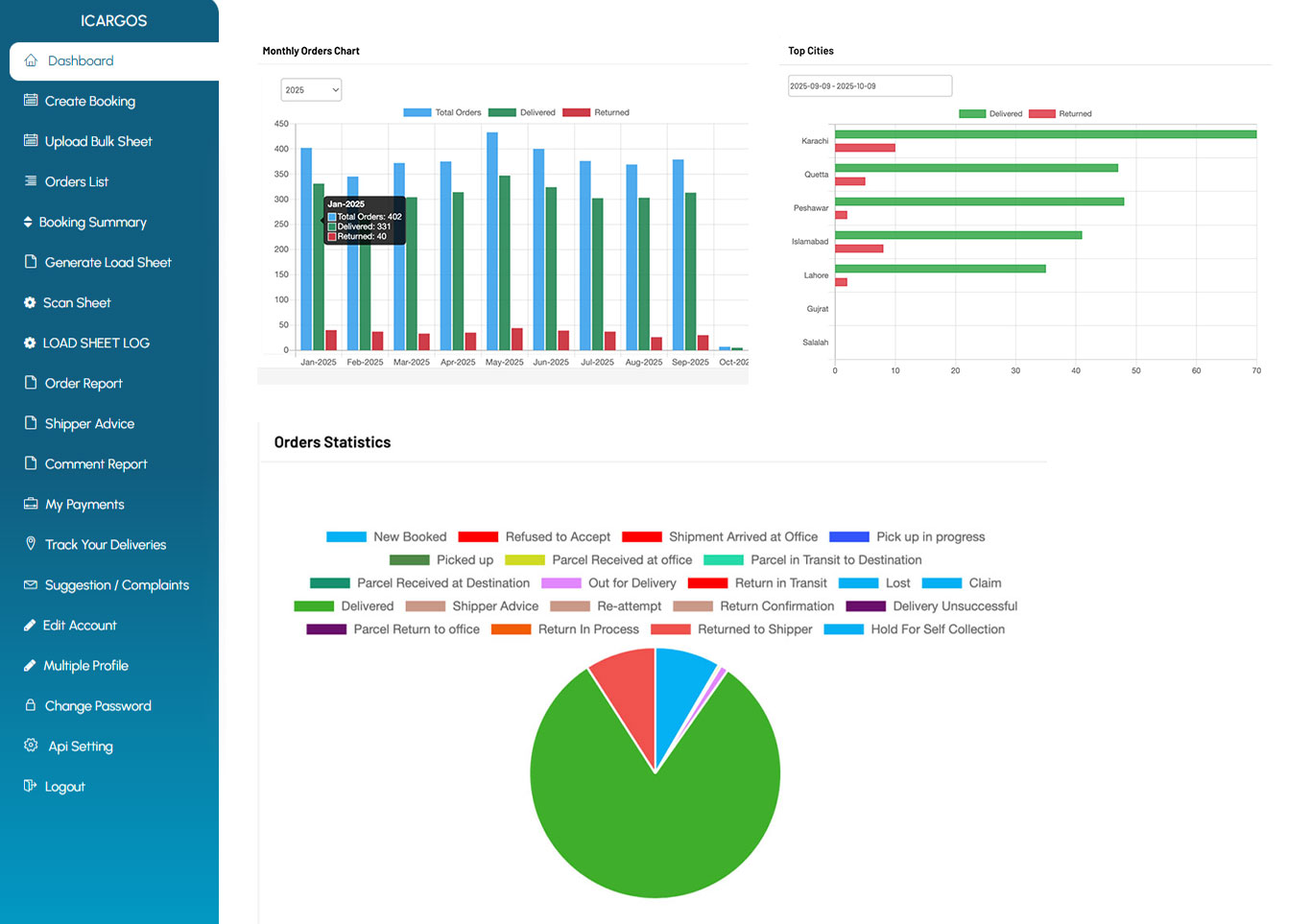
Status Cards (e.g., New Booked, Parcel Received at Office, Out for Delivery, Delivered, Return in Transit, Returned to Shipper, etc.)—each card shows count + % share so shippers understand the day instantly.
-
Pending COD Amount widget—high-visibility cash figure to drive faster closes.
-
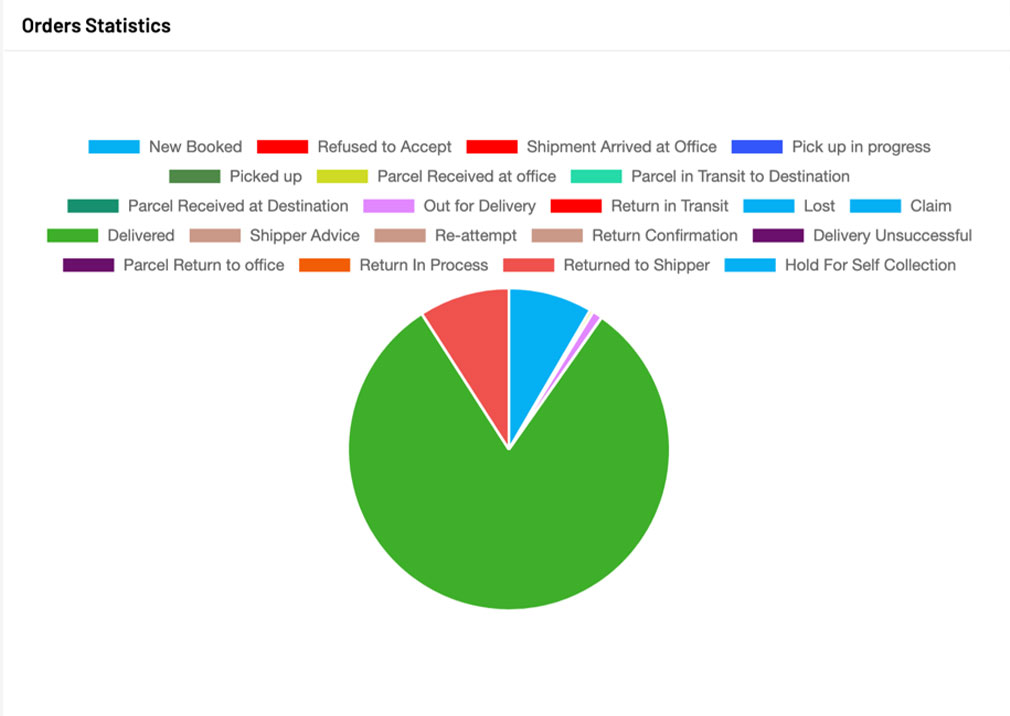
Orders Statistics (Pie)—delivered vs return/ndr mix at a glance.
-
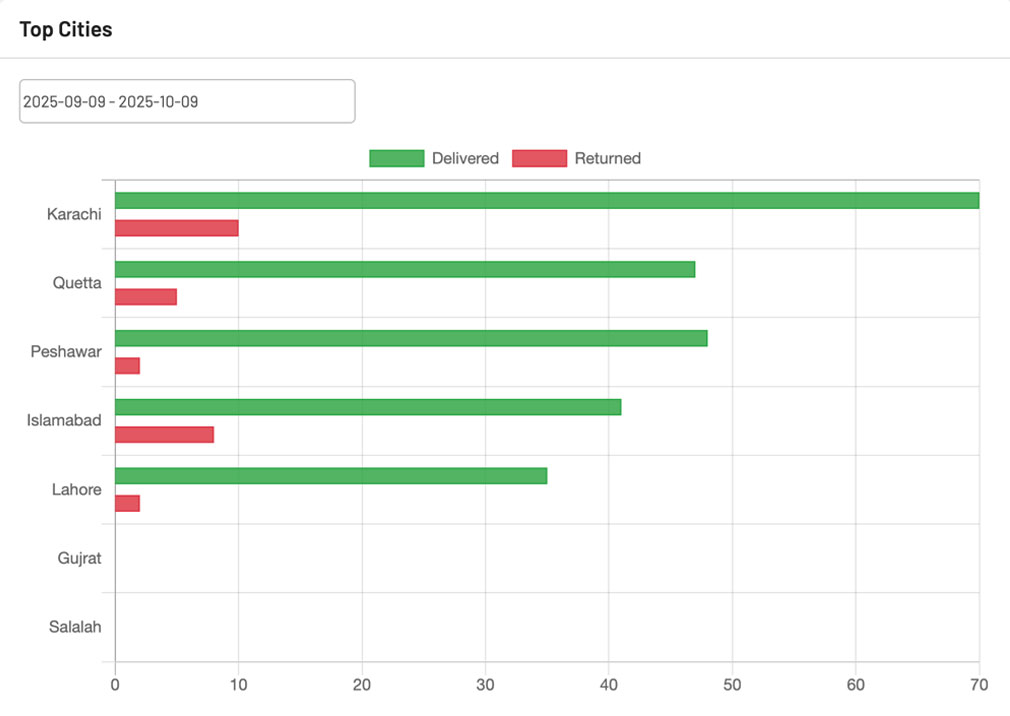
Top Cities (Bar)—where volumes and returns are concentrated.
-
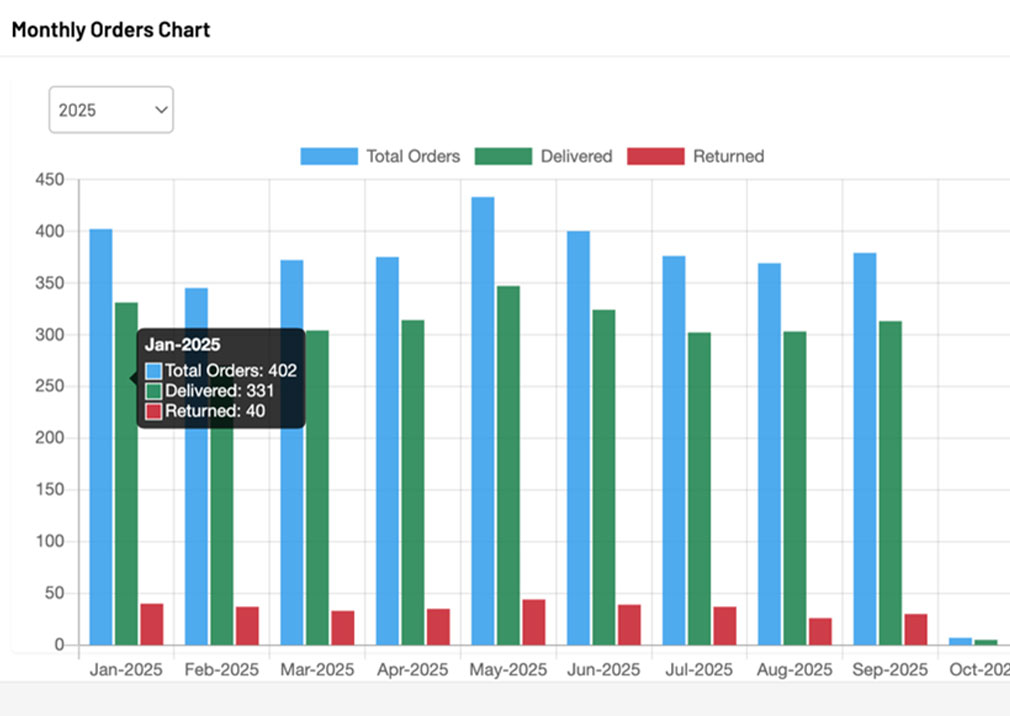
Monthly Orders Chart—month-over-month totals with delivered & returned bars.
Everything updates in real time as scans and delivery outcomes arrive from iCargos.
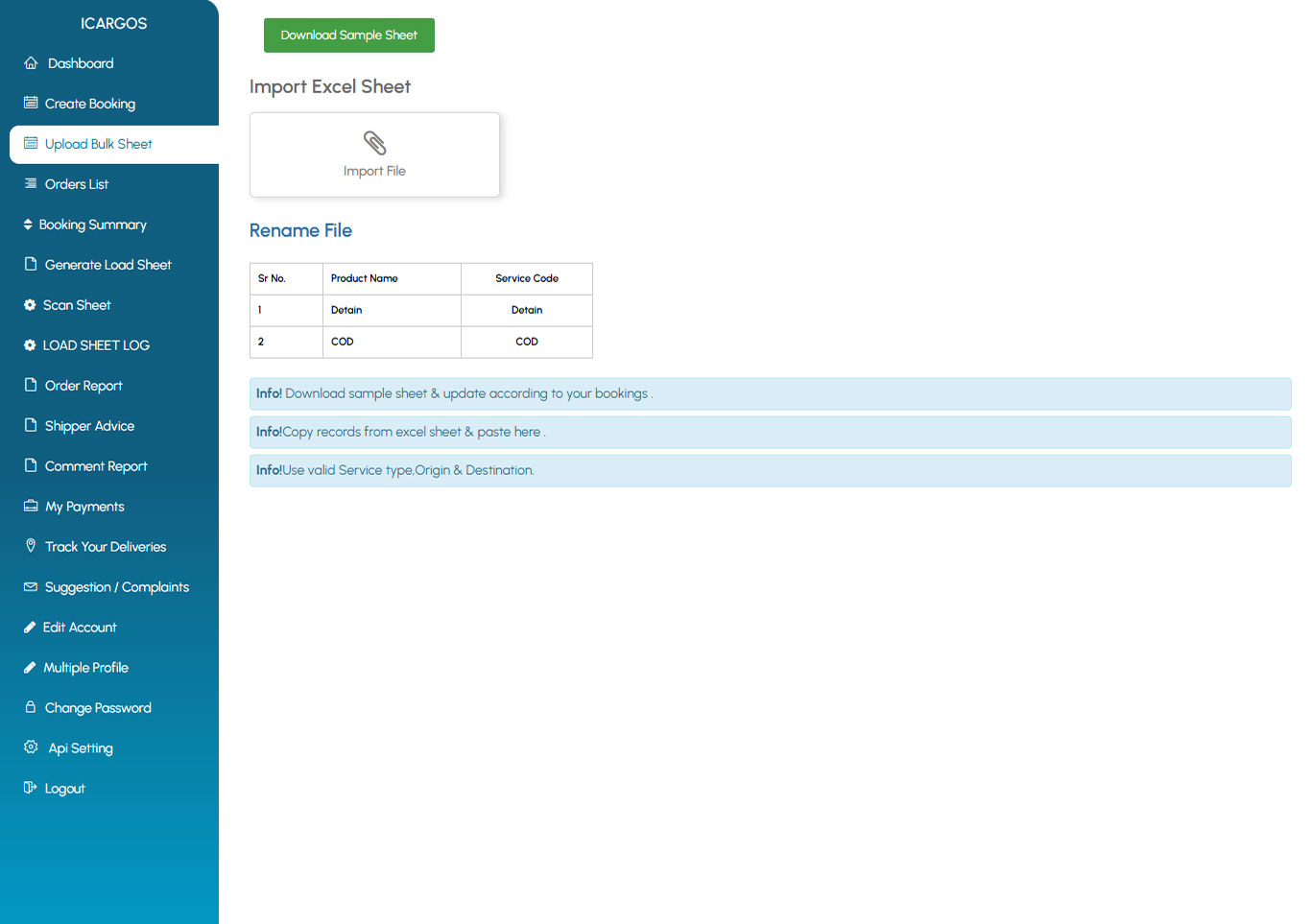
Upload Bulk Sheet (Hundreds in Minutes)
-
Download sample → fill offline → Import Excel (error checks included).
-
Validate service type, origin/destination, weights, and COD amounts before accepting.
-
Bulk label print and pickup scheduling once uploaded.
-
Full import log for audit.
Create Bookings (Single Order)
-
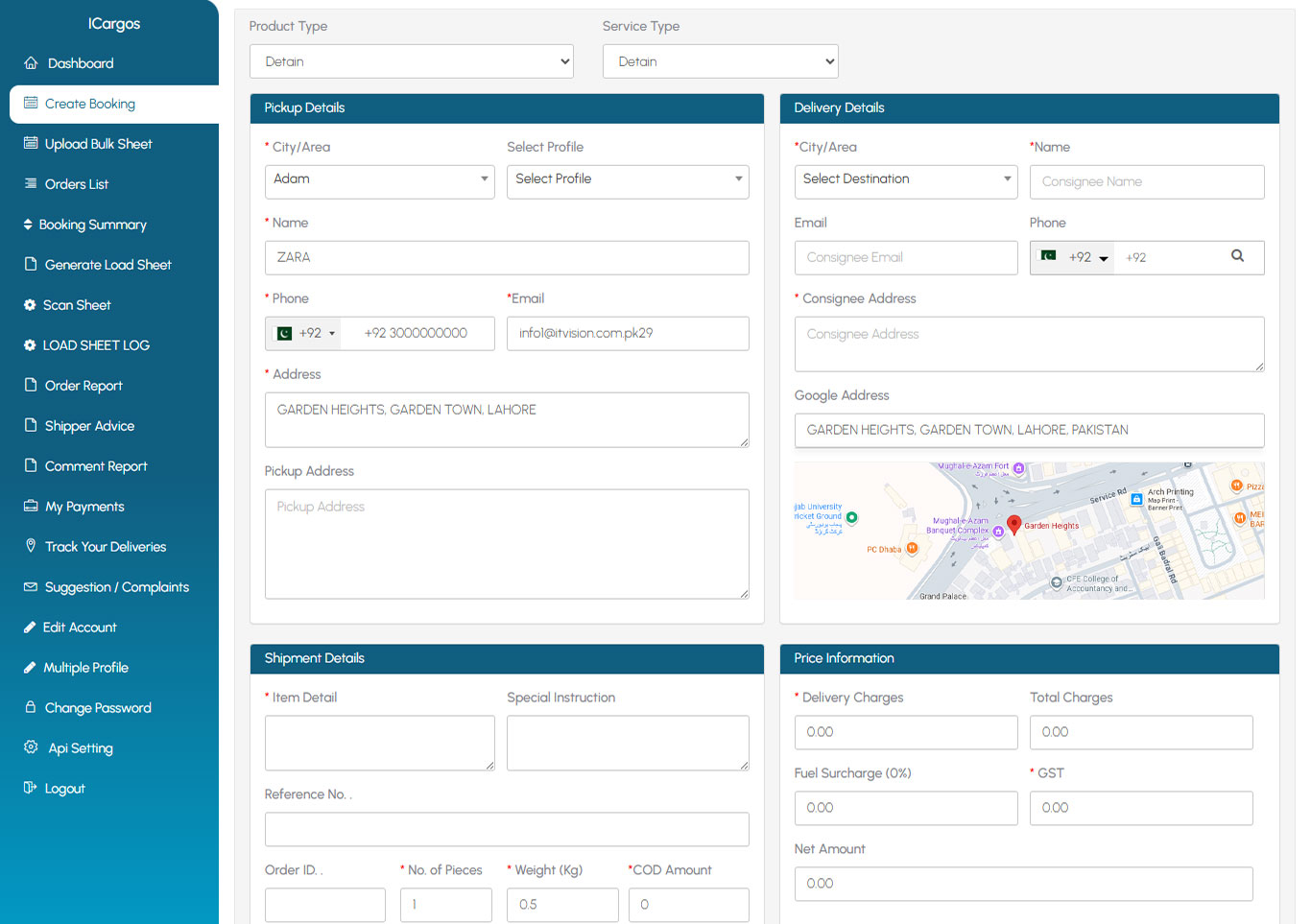
Fast form: pickup & delivery details, phone validation, weight/pieces, COD amount.
-
Charges preview (as per your tariff rules).
-
Label printing and booking confirmation in one click.
-
Address book & saved profiles to reduce retyping for repeat senders/consignees.
Track & Act (Orders List)
Show your “Orders List” screenshot with these highlights:
-
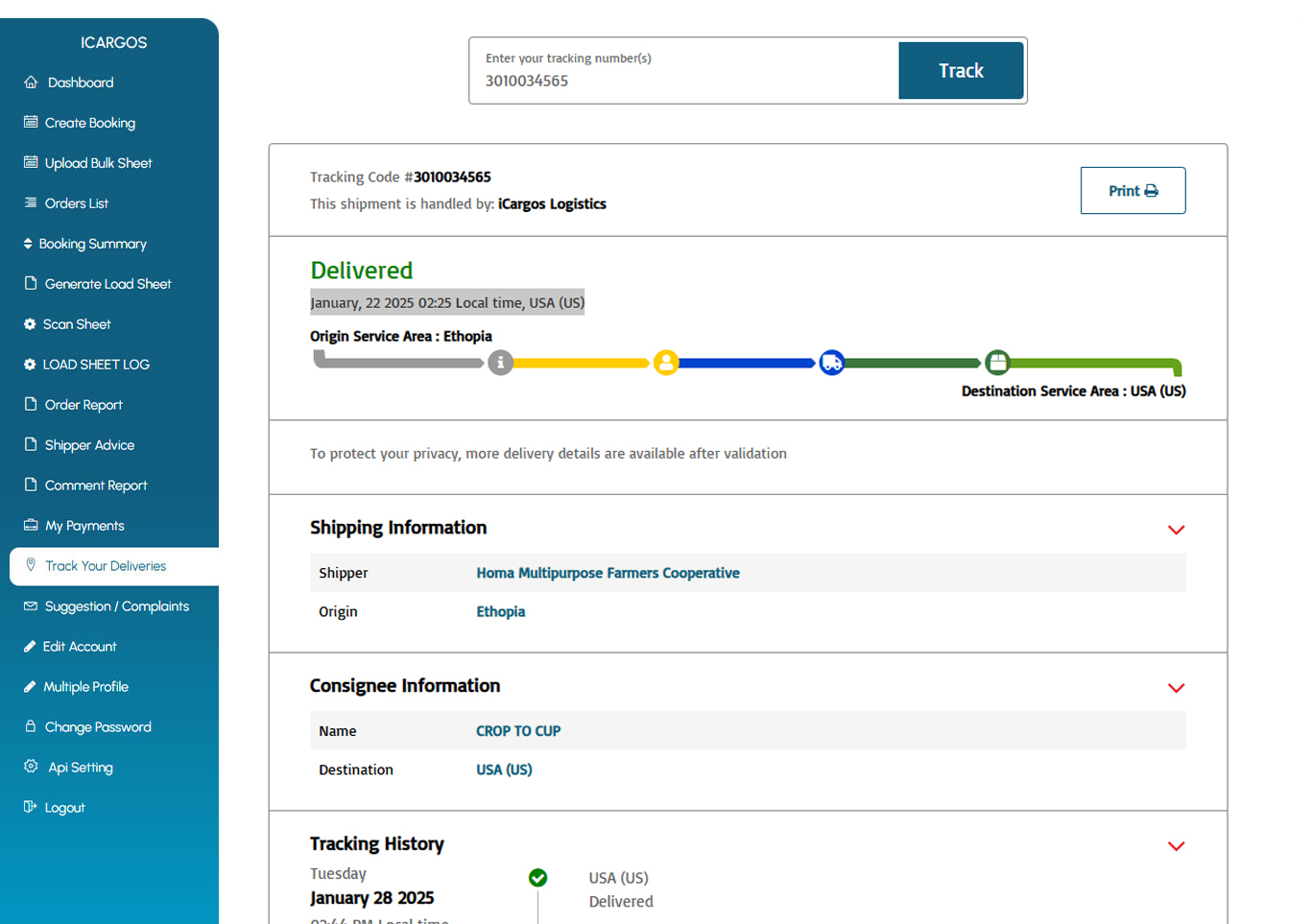
Live Tracking button per shipment (opens customer-facing tracking page with progress bar, time window, map).
-
Status timeline (New Booked → Parcel Received at Office → In Transit → Out for Delivery → Delivered/Returned).
-
Quick actions: View Details, Print Label, Copy Tracking Link, Download ePOD.
Shipper Advice (Reattempt / Return)
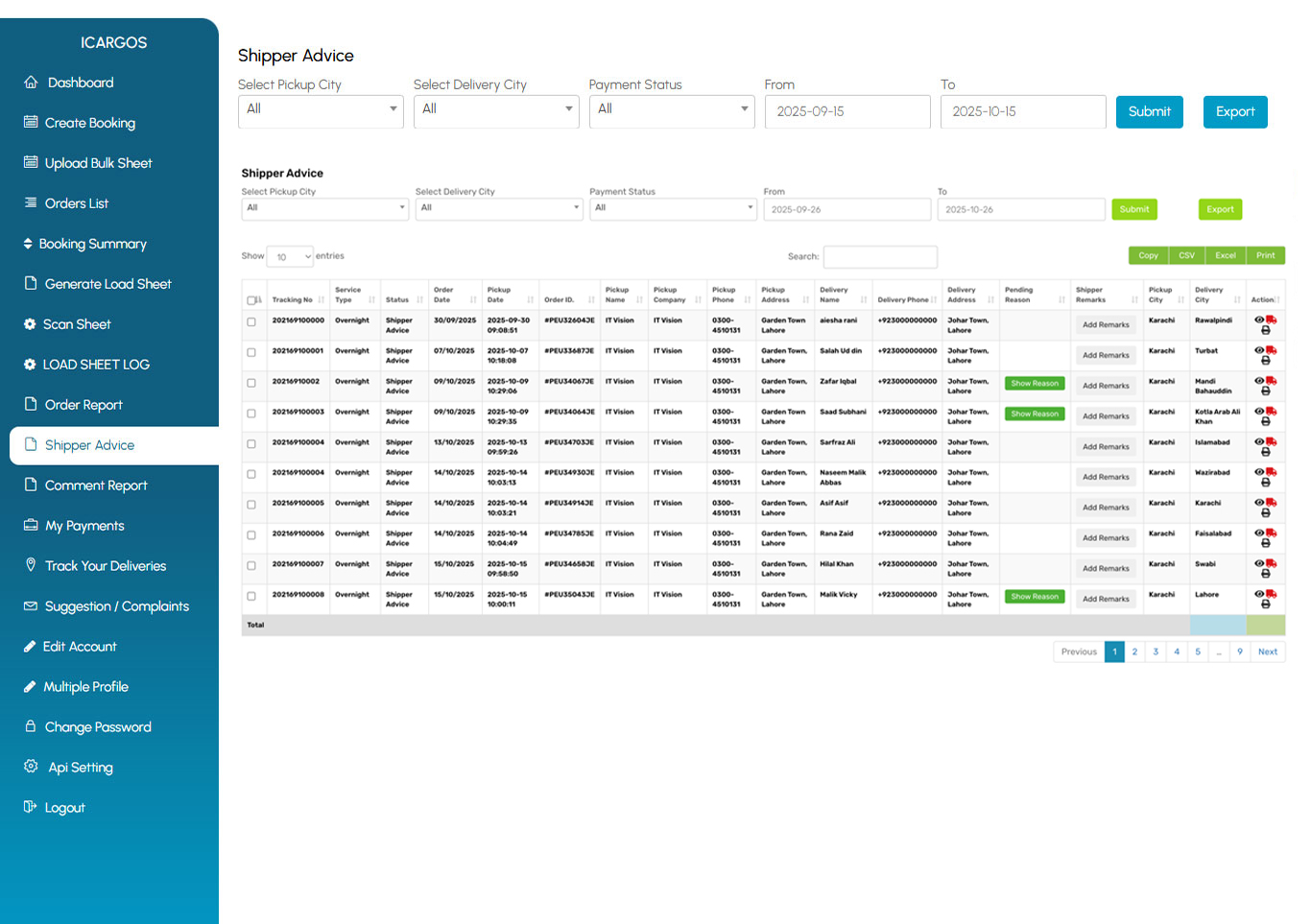
When a delivery fails, the shipper doesn’t need to call support.
-
See failure attempts with reasons.
-
Submit Reattempt (choose date/time window) or Return to Shipper with notes.
-
Advice is logged, visible to dispatch, and sent to the rider app instantly.
-
Admins can respond or override with comments for transparency.
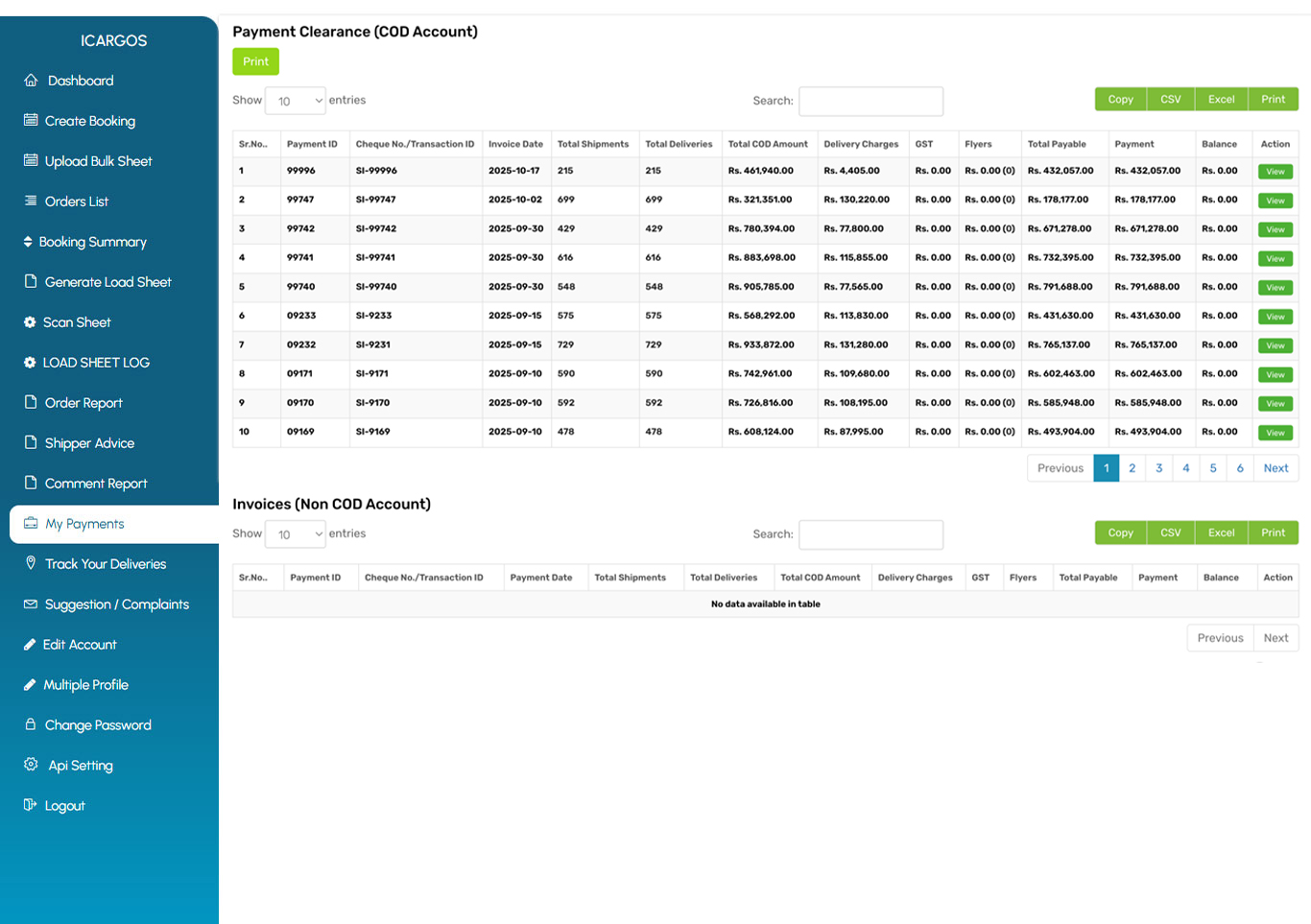
Payments & COD
-
Pending COD Amount visible on the dashboard.
-
My Payments: statements, filters by date range, downloadable PDFs/CSVs.
-
COD receipts & ePOD attached to orders for dispute-free reconciliation.
-
Optional wallet view if you hold balance-based settlements.
Reports & Analytics
-
Orders Statistics Pie: delivered share vs returns/ndr.
-
Top Cities Chart: city-wise delivered vs returned; spot problem areas.
-
Monthly Orders Chart: totals, delivered, returned—see seasonality and growth.
-
Export all reports (CSV/Excel) for BI tools.
Integrations & API (Automate Your Workflow)
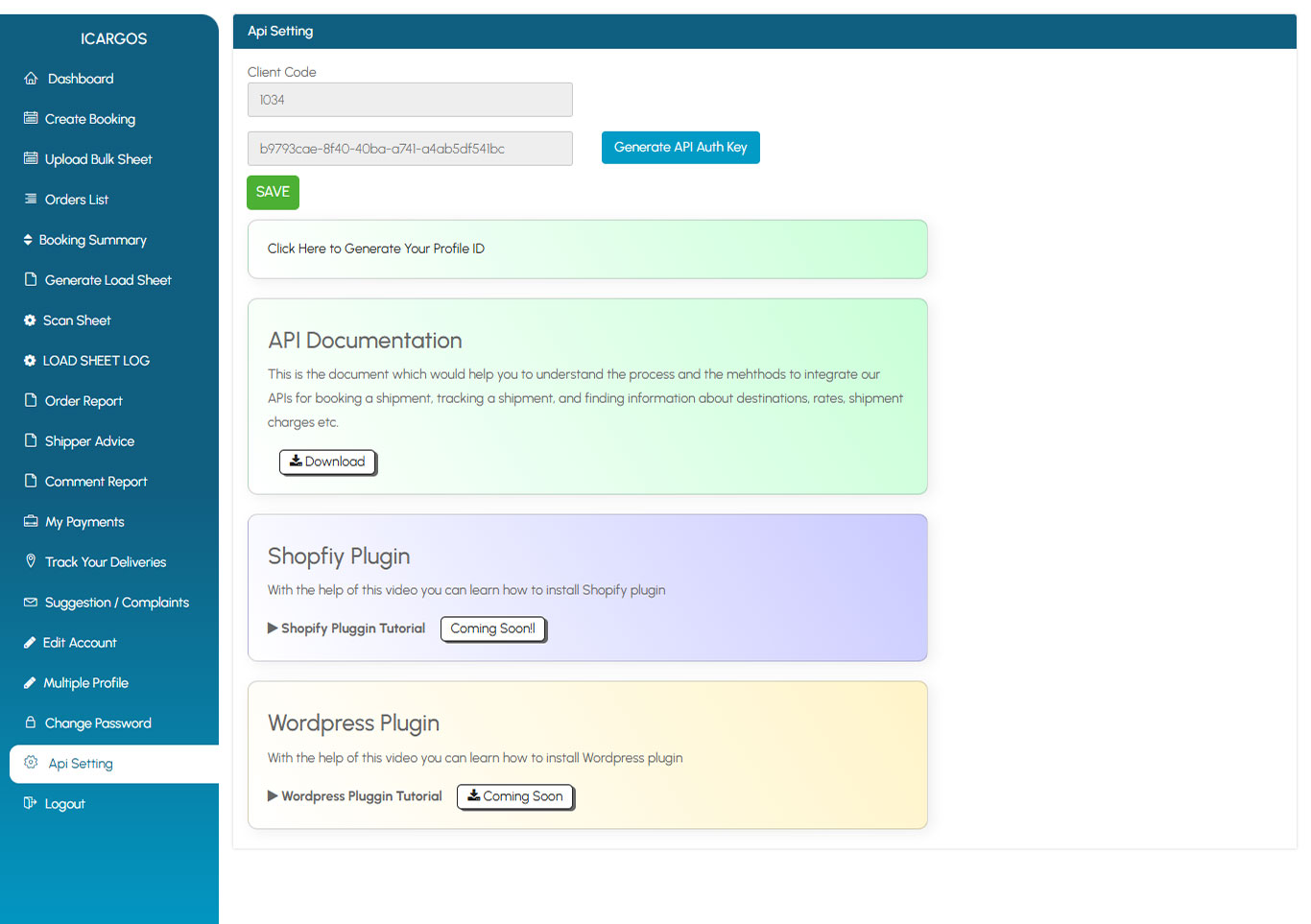
Show your “API Setting” screenshot with the following:
-
Generate API Auth Key and Profile ID inside the portal.
-
API Documentation: endpoints for booking, tracking, rates, charges.
-
Shopify Plugin (coming soon)—sync orders, print labels, push tracking links.
-
WordPress/WooCommerce Plugin (coming soon)—easy setup guide & tutorial.
Real-Time Tracking for Your Customers
-
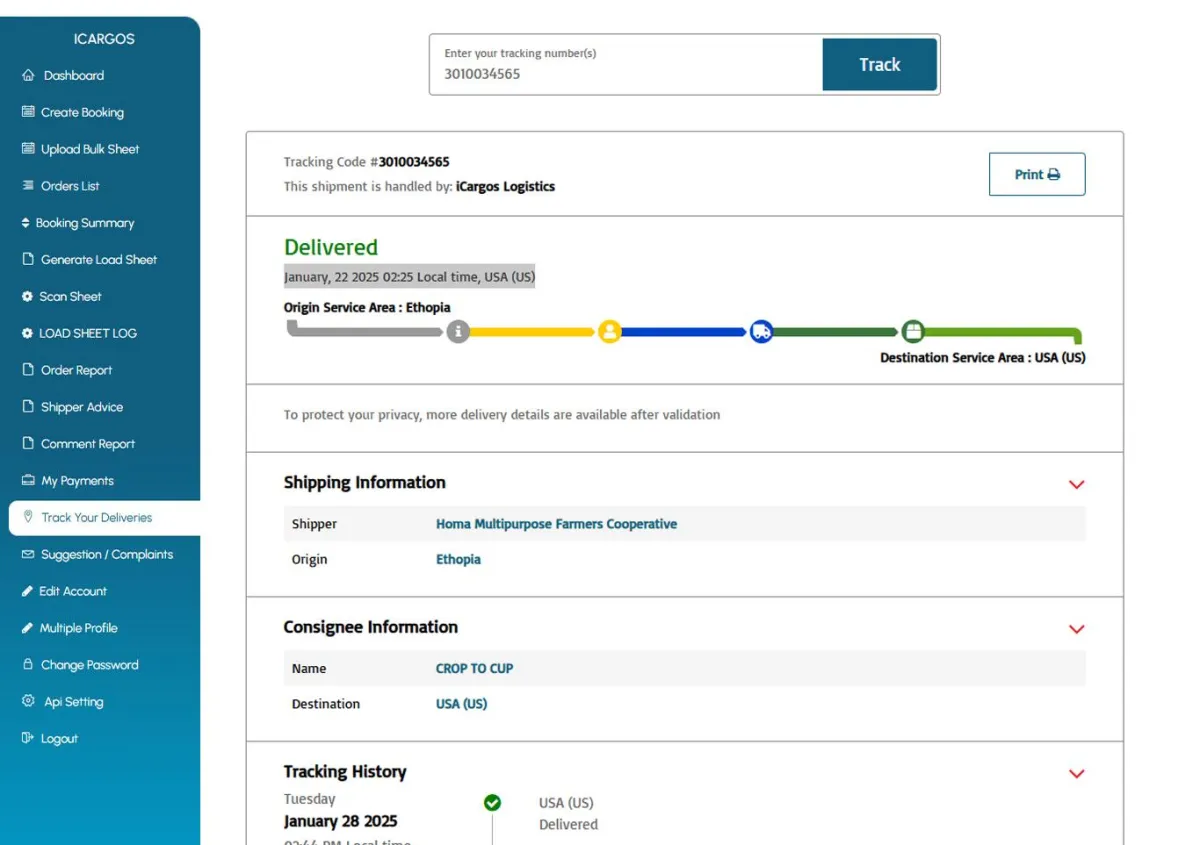
Every parcel’s tracking page shows live status & ETA, ePOD on completion, and optional reschedule/address update (if you allow it).
-
Delivery evidence is Signature / Photo / OTP via SMS alert, geo-stamped and time-stamped.
-
You can share the link directly from the Orders List or via automated notifications.
Why Shippers Love the Portal

Speed
single/bulk booking and label printing in minutes.

Clarity
live status cards and charts reduce “Where Is My Order?” calls.

Control
request reattempts/returns with context; no ticket back-and-forth.

Cash certainty
pending COD and statements always in view.

Proof on file
instant ePOD download ends disputes.
Security & Roles
-
Role-based access for your clients (owner, finance, operations).
-
Audit trail for imports, edits, and status changes.
-
Data retention per your policy (long-term retention supported for audits & disputes).
-
SSO and regional hosting options available on higher plans.


Use Cases

Grocery/Hyperlocal
high-volume, tight windows; live charts show city heat.

Fashion/Beauty
bulk COD orders + frequent reattempts managed by shippers.

Electronics
mandate Signature/OTP, keep ePOD attached to invoices.

B2B Line-haul
booking + manifest visibility + downloadable documents.
Testimonials
★ ★ ★ ★ ★
MashaAllah. Nice and dedicated managment of Mr Idress has impressed me. I am here to visit him for a portal for my MZ Courier Services. He managed it to finalize it very short time and had his weekend with me. Thanks Idress Sb.

Muhammad Mudassir Zafar
ZM Express
22-06-2025
★ ★ ★ ★ ★
We are using it vision Pvt Lt services from three years I must say excellent services keep it up. And best of luck

Abrar Ahmed Kayani
ZM Express
10-06-2025
★ ★ ★ ★ ★
I'm working since last 5 years, completely satisfied. It Vision really helped me to grow my business by providing Support all the time and keep bringing the new features to keep update with the new things

Zahid Mehmood
ZM Express
20-06-2025
Frequently Asked Questions
Can customers assign deliveries to a rider themselves?
If enabled, yes. After pickup, the shipper can scan and generate a Delivery Run Sheet that assigns jobs automatically to the rider.
Can customers request a reattempt or return on failed deliveries?
Yes. In Shipper Advice, they select Reattempt or Return, add notes, and it reaches dispatch and the rider app immediately.
What proof of delivery (ePOD) options are available?
Digital Signature and Photo in-app, plus OTP prompt via SMS alert where configured. All proofs include time and GPS.
Do customers get alerts automatically?
You can enable notifications for Pickup scheduled, Out-for-Delivery, NDR with action link, and Delivery confirmation (with ePOD & invoice/COD receipt) via WhatsApp, SMS, Email, Push.
Can brands integrate their store to auto-create shipments?
Yes—use the API, and plugins for Shopify and WordPress/WooCommerce (with setup guides).
Ready to empower your riders?
Schedule a Live Demo and we’ll set up a sample run: assign jobs, scan, deliver with ePOD, and complete COD close—end-to-end in one session.


We’re Here to Help
Need assistance? Reach out to us anytime.

iCargos © Copyright 2026. All Rights Reserved. - Powered By IT Vision Pvt. Ltd.